Solve pipe networks free, in your browser.
Draw the network, press solve, read off flows, pressures and temperatures. Water, compressed air, process gas, hot lines and homogeneous slurries - size the pump, fan or compressor, then run the whole system over time as tanks fill, valves move and pumps start and stop.
Free means free: nothing to install, no account needed to solve, no trial clock. Open the studio and have your first answer in minutes.
Checked against closed-form solutions, EPANET and NASA's GFSSP across 31 public verification cases, with conservation residuals on every solve. See the cases
Sign in free to save, share and reopen your work.
The best free pipe-network solver on the web.
It runs in a browser tab with nothing to install, water and liquid networks solve free, and every build re-runs 31 public verification cases.
What is free, and what does Advanced add?
Free, for everyone
- Solve water and liquid networks - no account needed
- Time simulation - tanks, valve schedules, pump control
- Pumps at their duty point, with efficiency and NPSHa
- Scenarios and difference maps
- DN/Schedule pipe sizes, SI and imperial units
- EPANET .inp import, 20 worked examples and the standalone calculators
Advanced adds
- Compressible gas, with fans and compressors
- Heat transfer - per-pipe loss or gain, mixing and energy balance
- Non-Newtonian fluids (power-law and Bingham)
- All result exports - CSV, Excel, calculation report, PNG, SVG, EPANET .inp
- CFD coupling export (STAR-CCM+)
No modules, no maintenance contract, no licence server - and your models leave with you.
The calculation you've been putting off
Why do pipe-network calculations keep getting put off?
Every engineer has one. Four reasons it keeps sliding down the list - and what we did about each.
Do I need expensive software for pipe-network analysis?
“The big packages cost a fortune, and I barely use most of the features.”
No. Water and liquid networks solve free in your browser. Advanced adds gas, heat transfer and non-Newtonian flow for A$39 a month - not a five-figure desktop licence for features you never open.
How quickly can I run a pipe-flow calculation?
“Half the time I just need a sanity check, not a modelling project.”
Open a browser tab, drop in a few pipes and a pump, and solve in seconds - no install, no project setup, no ceremony.
Can I get to my pipe-network projects on site?
“Everything lives on one office desktop. On site, I'm working from screenshots.”
Fluid Network Studio runs in any browser, on any device. Sign in and your saved networks are right there - desk, site or home.
How long does Fluid Network Studio take to learn?
“I don't use it often enough to stay fluent - every time I open it, I'm re-learning it.”
If you can sketch a network, you can solve one. No manual, no training course, and nothing to re-learn when you come back in six months.
Verified, not just tested.
How do I know the solver's answers are right?
Every build re-runs 31 public verification cases. The closed-form, EPANET and control-valve checks agree with their references to within 0.32%. The independent NASA GFSSP examples and published-element references agree to within 2.61%. Nothing is tuned to match a target, and every solve you run reports its own mass- and energy-conservation residuals.
Fluid Network Studio is independent and not affiliated with, endorsed by or sponsored by NASA or the OpenWaterAnalytics project. Those names identify the software these results are compared against.
Capabilities
One studio covers liquid, gas, heat-transfer and non-Newtonian solves, steady or over time, with the rotating machinery in the same model. The physics is verified case by case against published references, including independent cross-checks against OWA-EPANET 2.2 and NASA's GFSSP, and conservation residuals are reported on every solve.
A solver you can check, not just trust
What method does the solver use, and how can I check a result?
Steady-state flows and pressures for any branched or looped network, with the evidence they are right: named methods (Todini–Pilati global gradient, Darcy–Weisbach with Churchill friction) and machine-precision mass and energy residuals on every solve. See the verification cases.
Catch heat loss before it costs you
How much heat does a pipe run lose along its length?
Add heat transfer and see where every pipe loses or gains it - inner films (Gnielinski, Dittus–Boelter), walls and insulation, or a direct U value. Streams mix by enthalpy at junctions, and an energy balance runs on every solve.
Size gas lines with the same rigour as water
Can I solve compressible gas, not just liquid?
Switch the fluid to a gas and solve in absolute pressure with mass-flow balances - isothermal or with heat transfer. 12 gas presets plus custom gases, real-gas density (Peng–Robinson) and temperature-dependent viscosity.
Know a pump will hit its duty point
How do I find a pump's operating point before specifying it?
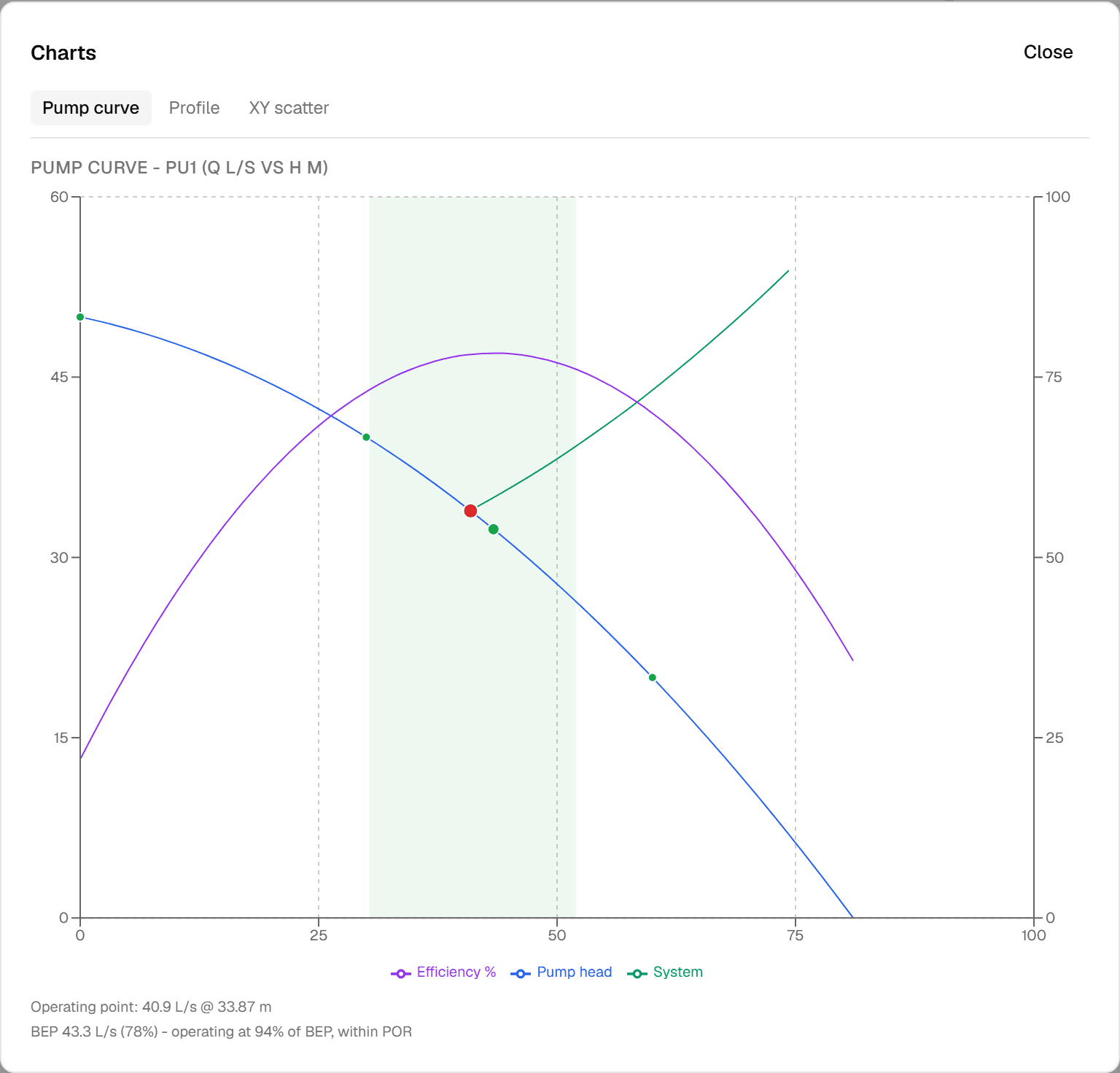
Read off the operating point and power before you specify the machine. Duty-point wizards, variable-speed affinity laws, efficiency and best-efficiency-point checks, NPSHa with a cavitation flag, and fan curves scaled to inlet density.
Run the system over time
How does the system behave over a full day, not just at one instant?
Watch tanks fill and drain, valves follow schedules, pumps start and stop with hysteresis, demands vary through the day. Play or scrub the timeline and export any element's time series. Quasi-steady - water hammer and surge stay with the specialist surge packages.
Compare design options side by side
How do I compare two design options on the same network?
Keep named scenarios of one network - the duty case and the future case, two pipe sizes, a pump swap - and compare two solves directly: a difference map colours what changed and a delta table reads out both results.
Model the whole system, and switch parts in and out
Which boundaries, valves and fittings can I model, and can I isolate a branch?
Reservoirs, pressure and flow boundaries, control valves (PRV, PSV and FCV), non-return valves that actually stop reverse flow, 50 standard fittings with indicative K values of the kind tabulated in Crane TP-410 and ASHRAE (editable per fitting), non-circular ducts - and any connecting node can close a whole branch.
Work from a deep library, in your own units
Are the pipe sizes, materials and fluids I need already built in?
Three pipe-dimension standards with DN and Schedule lookups, 28 pipe-material roughness presets, 25 liquid and 12 gas presets - and switchable SI or imperial units with no conversion sheet.
Find velocity and pressure problems before commissioning
How do I spot a velocity or pressure problem in the results?
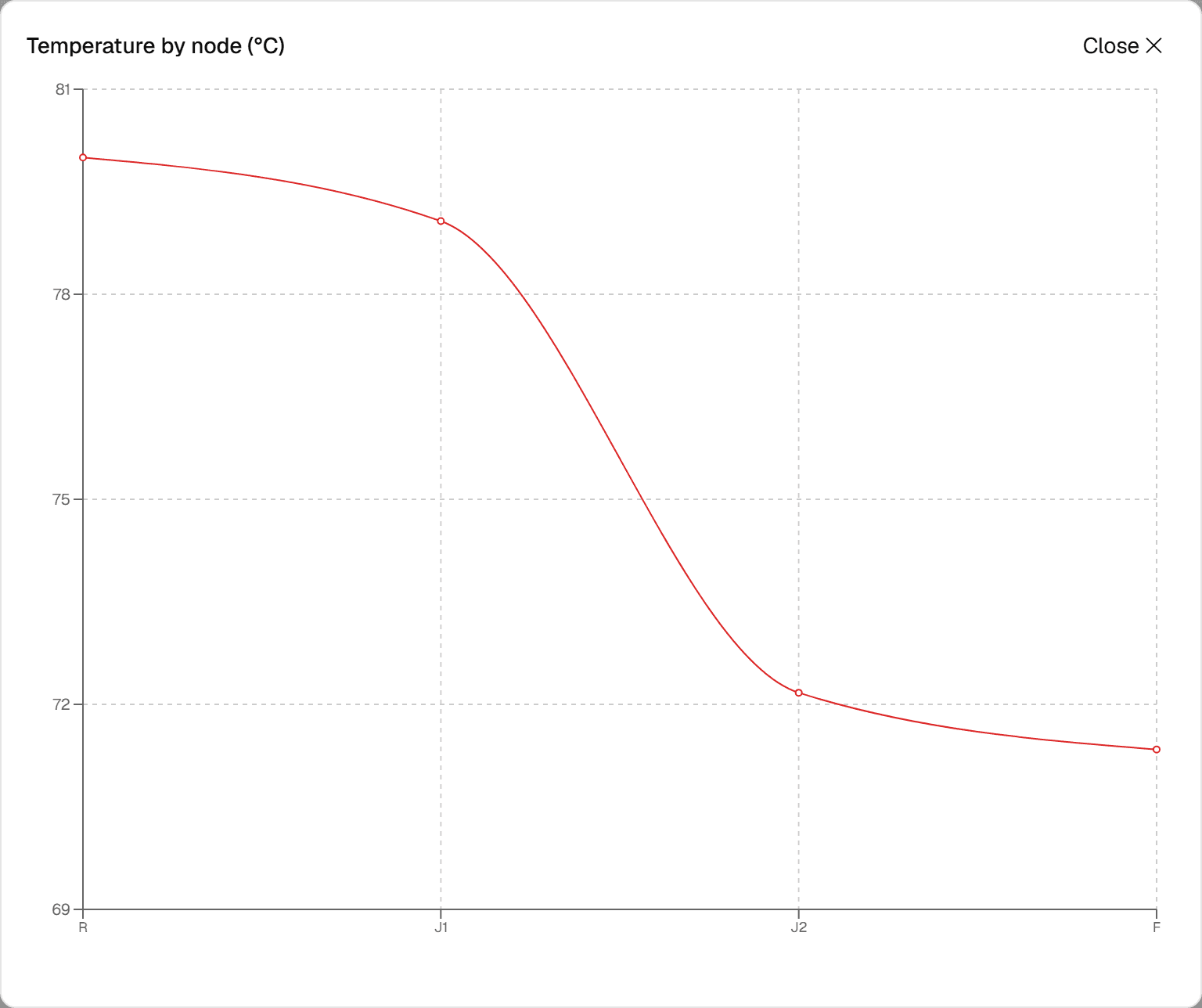
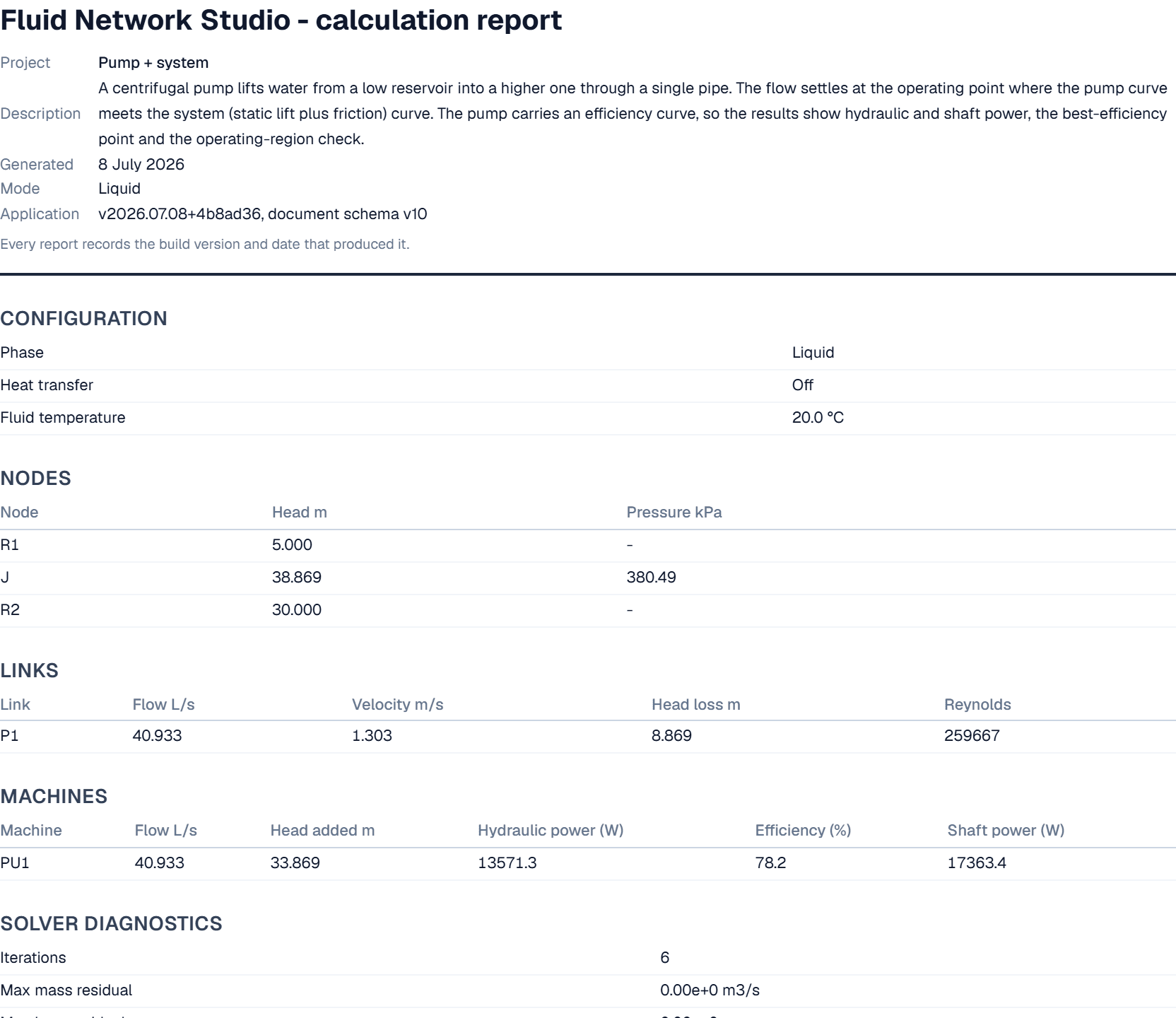
See answers as colour, charts and tables so problems stand out before they reach site: colour by velocity, pressure or temperature, HGL and temperature profiles, per-pipe diagnostics, CSV export and a print-ready calculation report.
Couple the network to your CFD model
Can the solved network drive a boundary condition in CFD?
Export a STAR-CCM+ macro that embeds the solved network as a live boundary condition - flows, pressures and (with heat on) temperatures exchanged as the simulation converges, with a read-only preflight before it couples anything.
Your work leaves with you
Where are my models stored, and can I get them out again?
Work entirely in the browser: save to a local file free, import EPANET .inp free, or sign in to store projects in the cloud, isolated to your account. Your models are never trapped in the tool.
Start from what you already have
Can I start from an EPANET model I already have?
Import an existing EPANET .inp model free (control valves keep their control law), open any of the 20 built-in examples, or use the free standalone calculators for the one-line checks. See the free calculators.
See the output
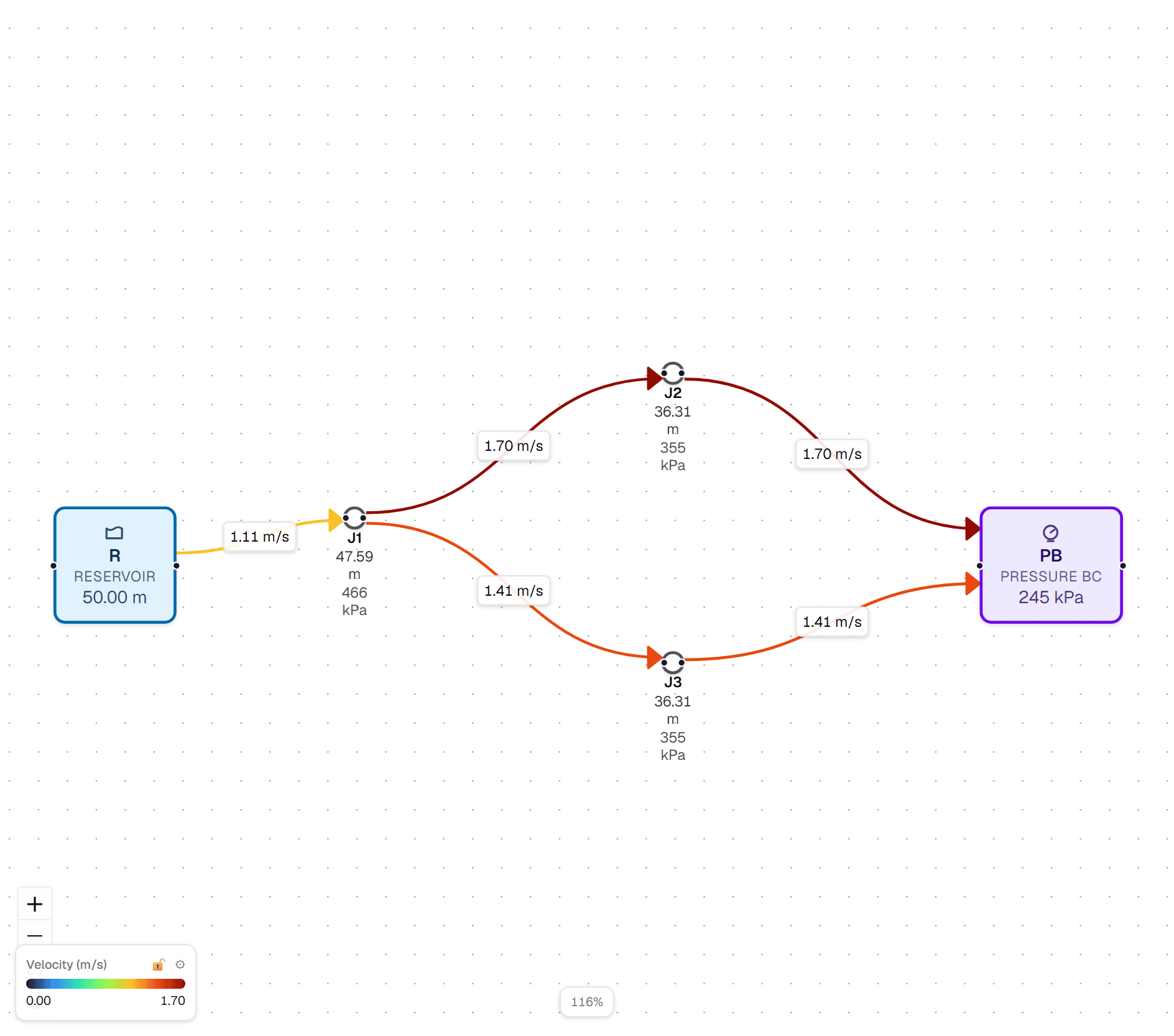
Real solver output from the built-in example networks - open any of them and reproduce it yourself.
Example networks
Worked examples across all four modes - water networks, hot-water mains losing heat, compressed air, fans, compressors and a hot gas line. Open any of them in the Studio and solve for free - no account needed.
Three-reservoir junction
The classic three-reservoir problem: three reservoirs at different water levels feed a common junction that also draws a fixed demand.
Open in Studio →Extensive distribution network
A pumped, looped water-distribution grid: a pump station lifts from a low supply into a ladder of mains with three demand draw-offs, an in-line fitting and a throttle valve, balanced against an elevated storage tower.
Open in Studio →Insulated hot-water main
An 80 °C supply main in three 400 m segments: the first and last are insulated with 30 mm mineral wool, the middle one is bare.
Open in Studio →Compressed-air line
An air line at ~6 bar gauge feeding a 1.15 kg/s draw-off through two pipes of different diameter.
Open in Studio →Bingham sludge line
A Bingham-plastic fluid (yield stress 8 Pa, plastic viscosity 0.03 Pa·s) pumped from a 30 m reservoir through a 100 m line to a draw-off.
Open in Studio →Tank fill with pump start/stop (transient)
A time-domain (transient) example: a pump lifts water into an open tank while a leak line drains it to a sink.
Open in Studio →Your data, your account
Straightforward about how your work and your details are handled - no lock-in, private by default, and honest about what is free and what needs a paid plan.
No lock-in
Your model stays yours. Save networks to a file and reopen them any time for free, and import an existing EPANET .inp model at no cost. Paid plans add export to CSV, Excel, EPANET .inp, PNG and SVG. So your models leave with you - whatever happens to the product, your files open in other tools.
Private by default
Saved projects are visible only to you. When you sign in and save to the cloud, each project is tied to your account - no other user can see it or open it. Your saved projects are stored in Australia (Sydney).
Payments handled by Stripe
If you subscribe, your card details are entered directly with Stripe and are never stored by Fluid Network Studio.
Australian owned and developed
Built and maintained in Australia, for engineers who want a straightforward, dependable tool.
More detail is in our Privacy Statement.
Pricing
Building and solving your own liquid networks is free. A free account saves your work and gives you a bigger canvas.
Free
Free
For: everyday water and liquid work. Sign in free to solve your own.
- Solve your own liquid (hydraulic) networks
- 50 elements per network - plenty for most day-to-day systems
- Try without an account: up to 15 elements, and every example network
- 1 AI import a week (Build with AI)
- Time simulation - tanks, valve schedules, pump control
- Scenario comparison and difference maps
- Cloud save & load (up to 10 projects) once you sign in
- All 20 example networks, editor and visualisation tools
Advanced
14-day free trial
For: process engineers who need gas, heat or non-Newtonian flow - and anyone exporting results.
- Everything in Free
- Up to 1,000 elements per network
- Unlimited AI imports (Build with AI)
- Compressible gas networks, with compressors and fans
- Non-Newtonian fluids (power-law and Bingham)
- Heat transfer - per-pipe loss or gain, mixing and energy balance
- All result exports: CSV, Excel, calculation report, PNG, SVG, EPANET .inp
- CFD coupling export, unlimited cloud projects, gas scenario comparison
Team
Contact us
For: offices that share models and want volume licensing.
- Everything in Advanced
- Shared projects
- Priority support
- Volume licensing
Volume licensing for teams and offices.
Free covers water and liquid networks, with cloud save and scenario comparison. Advanced adds gas, heat, non-Newtonian flow, CFD coupling and all result exports (CSV, Excel, EPANET .inp, PNG, SVG).
When do I need Advanced?
Free covers most liquid work: water distribution, pump sizing, HVAC hydronics, cooling-water loops.
Choose Advanced for: compressed air and gas lines, hot lines losing heat, homogeneous slurries and pastes (power-law and Bingham), and thermal networks.
Time simulation - tanks, valve schedules and pump control - is included on every plan.